
Stock Screener
Moving Average Crossovers
- Crossovers are calculated using exponential moving averages (EMA).
- See Two Moving Averages for further details.
- Returns the number of days since the crossover occurred.
Signals
- Bull Signal
When the fast moving average crosses to above the slow moving average. - Bear Signal
When the fast moving average crosses to below the slow moving average.
Example 1: Trend Reversal
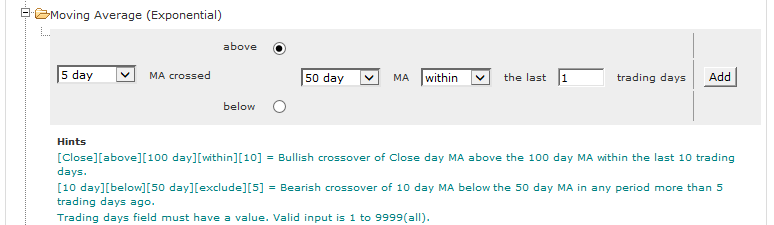
Filter for 5-day EMA crossing above the 50-day EMA within the last 1 trading days.
Example 2: Bullish Crossover
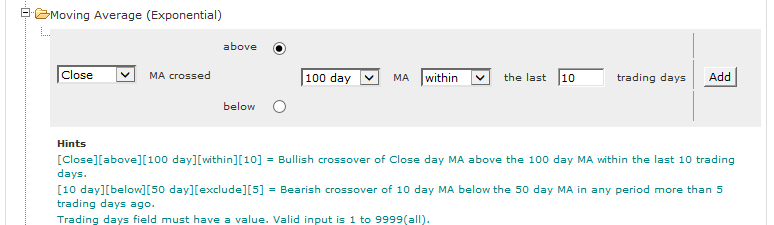
Filter for closing price crossing above the 100-day EMA within the last 10 trading days.
Example 3: Bearish Crossover
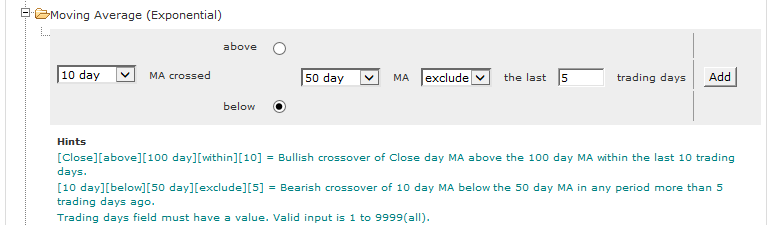
Filter for 10-day EMA crossing below the 50-day EMA before the last 5 trading days.
To Set the Moving Average Crossover:
- Open the Moving Average (Exponential) filter
- Use the drop-down to select the first moving average or "Close" if you want to identify closing price crossovers
- Choose above (Bull signal) or below (Bear signal)
- Select a second moving average or "Close"
- Select the number of days within which the crossover must have occurred or excluded
- Click Add to add the filter.
Example 4: Long-term up-trend
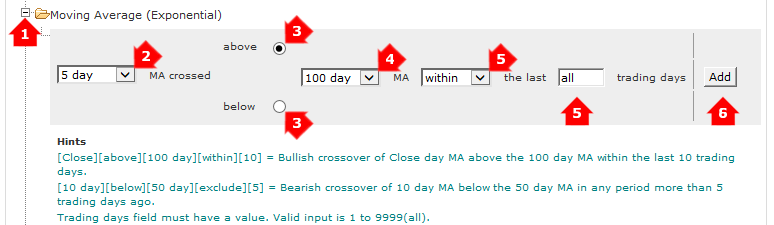
Filter for 5-day EMA crossing above the 100-day EMA within the last 9999 (all) trading days.
To screen for stocks that are in a long-term up-trend:
- Open the Moving Average (Exponential) filter
- Set a faster moving average (e.g. 5-day) as the first moving average
- Select above (Bull signal)
- Set a slower moving average (e.g. 100-day) as the second moving average
- Enter within all (or 9999) trading days
- Add the filter to your screen