
Filters: Bollinger Bands®
Bollinger Bands are calculated using exponential moving averages.
The standard deviation filter is used to confirm other trading signals, and indicates overbought and oversold levels relative to a selected moving average. This is done by comparing values to Bollinger Bands at 1.0 standard deviation above and below the selected moving average. For example:
- a reading of 250 indicates that closing price is at the 2.5 STD upper band;
- a reading of zero indicates that closing price is at the moving average; and
- a reading of -100 indicates that closing price is at the 1.0 STD lower band.
Signals
- Extremely high readings (eg. Minimum 250) indicate high volatility and possible sell opportunities.
- Readings above the moving average (eg. Minimum 100) indicate that price is in an up-trend.
- Extremely low readings (eg. Maximum -250) indicate high volatility and
possible buy opportunities.
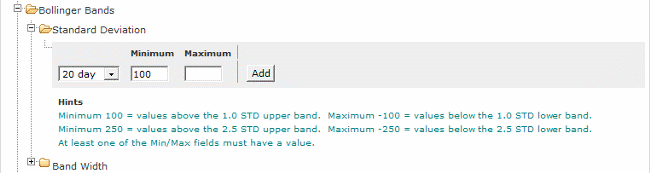
To Set the Bollinger Bands filter:
- Select the Bollinger Bands filter
- Then select the Standard Deviation filter
- Set the Day value, using the drop down box
- Enter a Minimum or Maximum value
Minimum = closing price is greater than (or equal to) the value entered
Maximum = closing price is less than (or equal to) the value entered - Click the Add button to add the filter.

Author: Colin Twiggs is a former investment banker with almost 40 years of experience in financial markets. He co-founded Incredible Charts and writes the popular Trading Diary and Patient Investor newsletters.
Using a top-down approach, Colin identifies key macro trends in the global economy before evaluating selected opportunities using a combination of fundamental and technical analysis.
Focusing on interest rates and financial market liquidity as primary drivers of the economic cycle, he warned of the 2008/2009 and 2020 bear markets well ahead of actual events.
He founded PVT Capital (AFSL No. 546090) in May 2023, which offers investment strategy and advice to wholesale clients.