
Stock Screener
% Of Price High
The % Of High compares the current closing price to the previous high:
- The latest closing price is compared to the highest closing price during the specified time period.
- The Minimum and Maximum fields are percentages, so 100% should be entered as "100", without the decimal.
- Negative numbers are not permitted.
Signals
- Minimum %
Today's close is not less than the specified percentage of the highest closing price. - Maximum %
Today's close is not more than the specified percentage of the highest closing price.
Tip
Enter 100% as the Minimum %, to find securities that have made new highs.
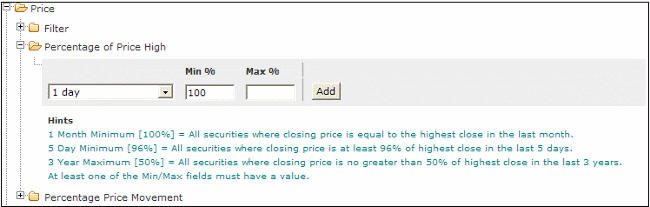
To Set the % Of Price High screen:
- Select the Price filter
- Then select the Percentage of Price High filter
- Select a time period for the filter
- Enter an amount in the Minimum or Maximum fields
- Click on the Add button to add the filter.

Author: Colin Twiggs is a former investment banker with almost 40 years of experience in financial markets. He co-founded Incredible Charts and writes the popular Trading Diary and Patient Investor newsletters.
Using a top-down approach, Colin identifies key macro trends in the global economy before evaluating selected opportunities using a combination of fundamental and technical analysis.
Focusing on interest rates and financial market liquidity as primary drivers of the economic cycle, he warned of the 2008/2009 and 2020 bear markets well ahead of actual events.
He founded PVT Capital (AFSL No. 546090) in May 2023, which offers investment strategy and advice to wholesale clients.