Search for a Security
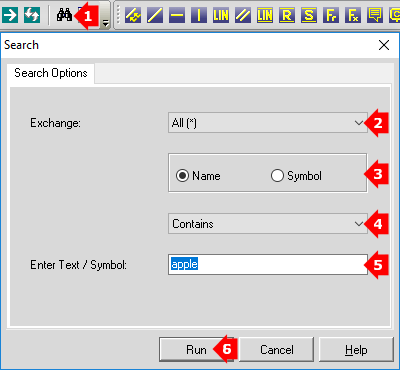
- Select
 Search on the toolbar or Securities menu. Search on the toolbar or Securities menu.
- Set an Exchange,or set All (*) to search all available exchanges.
- Choose whether you are searching for the Name or Symbol.
- Select whether the search term 'Contains', 'Starts With' or 'Matches'.
- Enter whole or part of the security's name or symbol in the relevant field.
- Click Run.
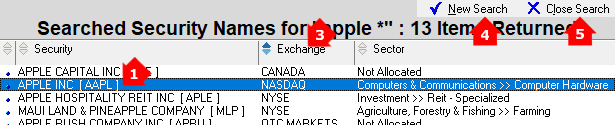
- Chart a security by double-clicking the name in the list of results
(or right-click and select Chart the Selected Security).
- Chart a security by double-clicking the name in the list of results
(or right-click and select Chart the Selected Security).
- Then to return to the results, select
 Search Results on the toolbar or Securities menu. Search Results on the toolbar or Securities menu.
- Sort results by selecting the column headings, click again to reverse the order.
- New Search opens the Search Options.
- Close Search to return to the charts.
|
|
|
|