
Select a Security
Enter a Security Code
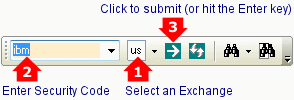
- Select an Exchange on the toolbar
- Enter the security symbol
- Click the Load Security button
 or hit the Enter key.
Alternative #1
You can also type the exchange code in the security field:
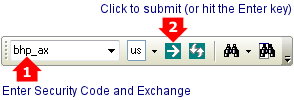
It is quicker to use a blank instead of an underscore (e.g. bhp ax)
Exchange Codes
Exchange codes are:
- ax = Australia
- ao = ASX ETOs & warrants
- us = US Equities & Indexes (including NYSE, NASDAQ, OTCBB & OTC Markets)
- fx = Forex
- pm = Precious Metals
- cm = Commodities
- ix = World Indices
Last 30 Stock Codes
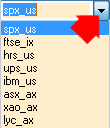
You can also use the drop-down list to select recently loaded securities:
Startup Default Security
You can now set a default security via Securities >> Set Current Security as Startup Default.
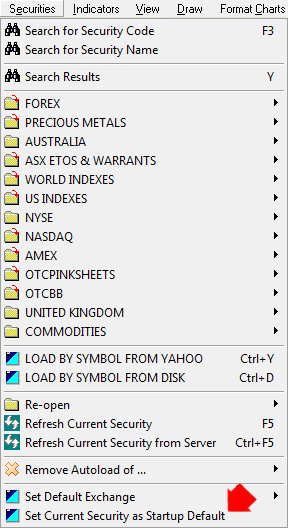
If the File >> Project Defaults >> Default Security is set, this will take precedence over the Startup Default.