
Customize Menus
Incredible Charts optimizes securities menu and watchlist display settings to fit your screen size and resolution. This selects the optimum menu length to fit your screen size, avoiding the need for scrolling menus. It does, however mean that lengthy menus will display sub-folders. You may wish to experiment with the settings.
Set Menu Length
If you prefer to customize your menu display:
- Select View >> Advanced Options >> Set Menu Length;
- Select your preferred menu length from the available options.
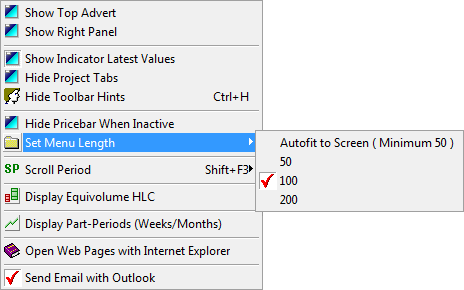
Maximum menu lengths can be set from 50 to 200. Autofit to Screen will adjust menu length to your screen size. Menus longer than the Set Menu Length will be divided into sub-folders. If you select a longer menu length, this may require you to scroll your menus using the arrows at the top and bottom of the displayed menu. Early versions of Windows (especially Windows 98 and earlier) sometimes fail to display these scrolling arrows. There is no available patch and we can only suggest that you upgrade Windows.
Menu Lengths
- The Windows operating system has limitations when it comes to displaying very large menus, like the Securities menus. To retain the existing functionality we have had to eliminate smaller menu lengths.
- When loading a large number of exchange menus, users may be prompted to increase the maximum menu length to 200 (the greater the menu length, the less load is placed on Windows OS). If you click OK, all menus will be reset to the new menu length. It may be advisable to restart your PC at this point because Windows is likely to be low on available resources.